terça-feira, 21 de junho de 2011

GA-H55N-USB3

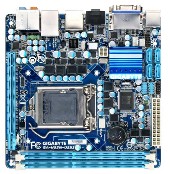
GIGABYTE - Motherboard - Socket 1156 - GA-H55N-USB3 (rev. 1.0)

CPU
  1. Support for an Intel® Core™ i7 series processor/Intel® Core™ i5 series processor/ Intel® Core™ i3 series processor in the LGA1156 package
    (Go to GIGABYTE's website for the latest CPU support list.)
  2. L3 cache varies with CPU
Chipset
  1. Intel® H55 Express Chipset
Memory
  1. 2 x 1.5V DDR3 DIMM sockets supporting up to 8 GB of system memory (Note 1)
  2. Dual channel memory architecture
  3. Support for DDR3 1666 (O.C.)/1333/1066/800 MHz memory modules
  4. Support for non-ECC memory modules
  5. Support for Extreme Memory Profile (XMP) memory modules

(Go to GIGABYTE's website for the latest supported memory speeds and memory modules.)
Onboard GraphicsIntegrated in the Chipset: (Note 2)
  1. 1 x D-Sub port
  2. 1 x DVI-D port (Note 3) (Note 4)
  3. 1 x HDMI port (Note 4)
Audio
  1. Realtek ALC892 codec
  2. High Definition Audio
  3. 2/4/5.1/7.1-channel
  4. Support for S/PDIF Out
LAN
  1. 1 x Realtek RTL8111E chip (10/100/1000 Mbit)
Expansion Slots
  1. 1 x PCI Express x16 slot, running at x16 (The PCIEX16 slot conforms to PCI Express 2.0 standard.)
Storage InterfaceChipset:
  1. 4 x SATA 3Gb/s connectors supporting up to 4 SATA 3Gb/s devices
  2. 1 x eSATA 3Gb/s connector on the back panel supporting up to 1 SATA 3Gb/s device
USBIntegrated in the Chipset
  1. Up to 8 USB 2.0/1.1 ports (4 on the back panel, 4 via the USB brackets connected to the internal USB headers)

NEC D720200F1 chip:
  1. Up to 2 USB 3.0/2.0 ports on the back panel


* USB 3.0 10x performance is a maximum theoretical value. Actual performance may vary by system configuration.
Internal I/O Connectors
  1. 1 x 24-pin ATX main power connector
    Connectors
  2. 1 x 4-pin ATX 12V power connector
  3. 4 x SATA 3Gb/s connectors
  4. 1 x CPU fan header
  5. 1 x system fan header
  6. 1 x front panel header
  7. 1 x front panel audio header
  8. 1 x S/PDIF Out header
  9. 2 x USB 2.0/1.1 headers
  10. 1 x debug card header
  11. 1 x chassis intrusion header
  12. 1 x clearing CMOS jumper
Back Panel Connectors
  1. 1 x PS/2 keyboard/mouse port
    Connectors
  2. 1 x D-Sub port (Note 2)
  3. 1 x DVI-D port (Note 2)(Note 3) (Note 4)
  4. 1 x optical S/PDIF Out connector
  5. 1 x HDMI port (Note 2)(Note 4)
  6. 4 x USB 2.0/1.1 ports
  7. 2 x USB 3.0/2.0 ports
  8. 1 x eSATA 3Gb/s connector
  9. 1 x RJ-45 port
  10. 6 x audio jacks (Center/Subwoofer Speaker Out/Rear Speaker Out/ Side Speaker Out/Line In/Line Out/Microphone)
I/O Controller
  1. iTE IT8720 chip
H/W Monitoring
  1. System voltage detection
  2. CPU/System temperature detection
  3. CPU/System fan speed detection
  4. CPU fan speed control (Note 5)
BIOS
  1. 2 x 64 Mbit flash
  2. Use of licensed AWARD BIOS
  3. Support for DualBIOS™
  4. PnP 1.0a, DMI 2.0, SM BIOS 2.4, ACPI 1.0b
Unique Features
  1. Support for @BIOS
  2. Support for Q-Flash
  3. Support for Xpress BIOS Rescue
  4. Support for Download Center
  5. Support for Xpress Install
  6. Support for Xpress Recovery2
  7. Support for EasyTune (Note 6)
  8. Support for Dynamic Energy Saver™ 2
  9. Support for Smart 6™
  10. Support for Auto Green
  11. Support for ON/OFF Charge
  12. Support for Q-Share
Bundle Software
  1. Norton Internet Security (OEM version)
Operating System
  1. Support for Microsoft® Windows 7/Vista/XP
Form Factor
  1. Mini-ITX Form Factor; 17.0cm x 17.0cm
Remark
  1. Due
    to different Linux support condition provided by chipset vendors,
    please download Linux driver from chipset vendors' website or 3rd party
    website.
  2. Most hardware/software vendors no longer offer support
    for Win9X/ME/2000/XP SP1/SP2. If drivers are available from the vendors,
    we will update them on the GIGABYTE website.
  3. Minimum 200 Watts Power supply is suggested on this model.
Note(Note
1) Due to Windows 32-bit operating system limitation, when more than 4
GB of physical memory is installed, the actual memory size displayed
will be less than 4 GB.

(Note 2) To use the onboard D-Sub, DVI-D, and HDMI ports, you must install an Intel CPU with integrated graphics.

(Note 3) The DVI-D port does not support D-Sub connection by adapter.

(Note 4) You can use only one of the onboard digital graphics ports
(HDMI and DVI-D) for output when in the BIOS Setup program or when
during the POST screens.

(Note 5) Whether the CPU fan speed control function is supported will depend on the CPU cooler you install.

(Note 6) Available functions in EasyTune may differ by motherboard model.

Nenhum comentário: